Lacrosse Tracker

Everything it does

A deeper look at what Lacrosse Tracker tracks, times, charts, and shares.

Live game mid-quarter: running clock, stat badges on player tiles, a penalty countdown, and clear/ride tallies
The live game screen — player then stat, or stat then player

On the sideline

Fast enough for a real game

Lacrosse doesn’t pause while you type. Every entry is two or three taps, the clock and score run themselves, and nothing is permanent — any mis-tap comes off the event timeline with one ×. You watch the field; the app watches the clocks.
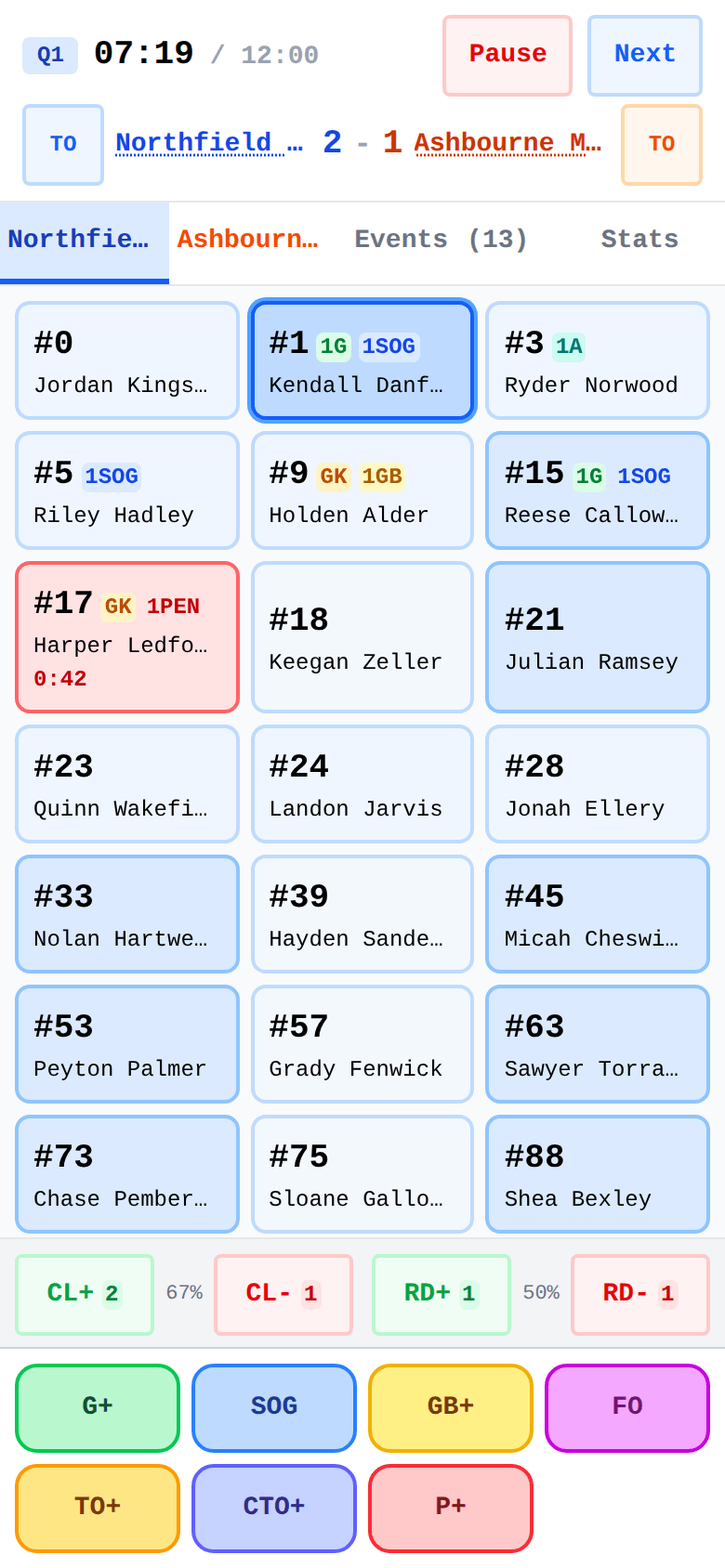
  • Tap the player then the stat — or the stat first, then the player. Both orders record the same event, so you use whichever matches how you saw it
  • Goal → tap the assister(s), done. Every shot classified goal / miss / save / blocked
  • Faceoffs credit both specialists in two taps; an opponent goal asks “who was in net?” so Save % survives goalie switches
  • One-tap team clears and rides with a live Clearing % and Riding %
  • Ground balls, caused turnovers, timeouts — one tap each; turnovers ask forced or unforced. Every team chooses which stats it tracks
  • 17 penalty types with youth, high-school, and college presets — the countdown runs right on the player’s card, man-up / man-down at a glance
  • Penalty assistant: pause, adjust to match the ref, or release early
  • Remove an assist or goalie attribution without deleting the goal; undo an accidental period change
  • Fix a jersey number or add a late arrival mid-game — your saved roster stays untouched
  • Know nothing about the other team? Leave them as just a name — their side is a single Opponent tile that records any stat you track for them, and their score still stays right
  • A Stats tab inside the live game — momentum, faceoff %, turnovers, clearing and riding, both goalies' save %, and the running box score. Check it at a timeout or the half without leaving the game, and it is the same read you get after the whistle
  • A panel with nothing solid to say stays quiet instead of reporting a hollow 0 % — you never read a number the game didn't earn
  • The screen stays awake; close the app and resume exactly where you were
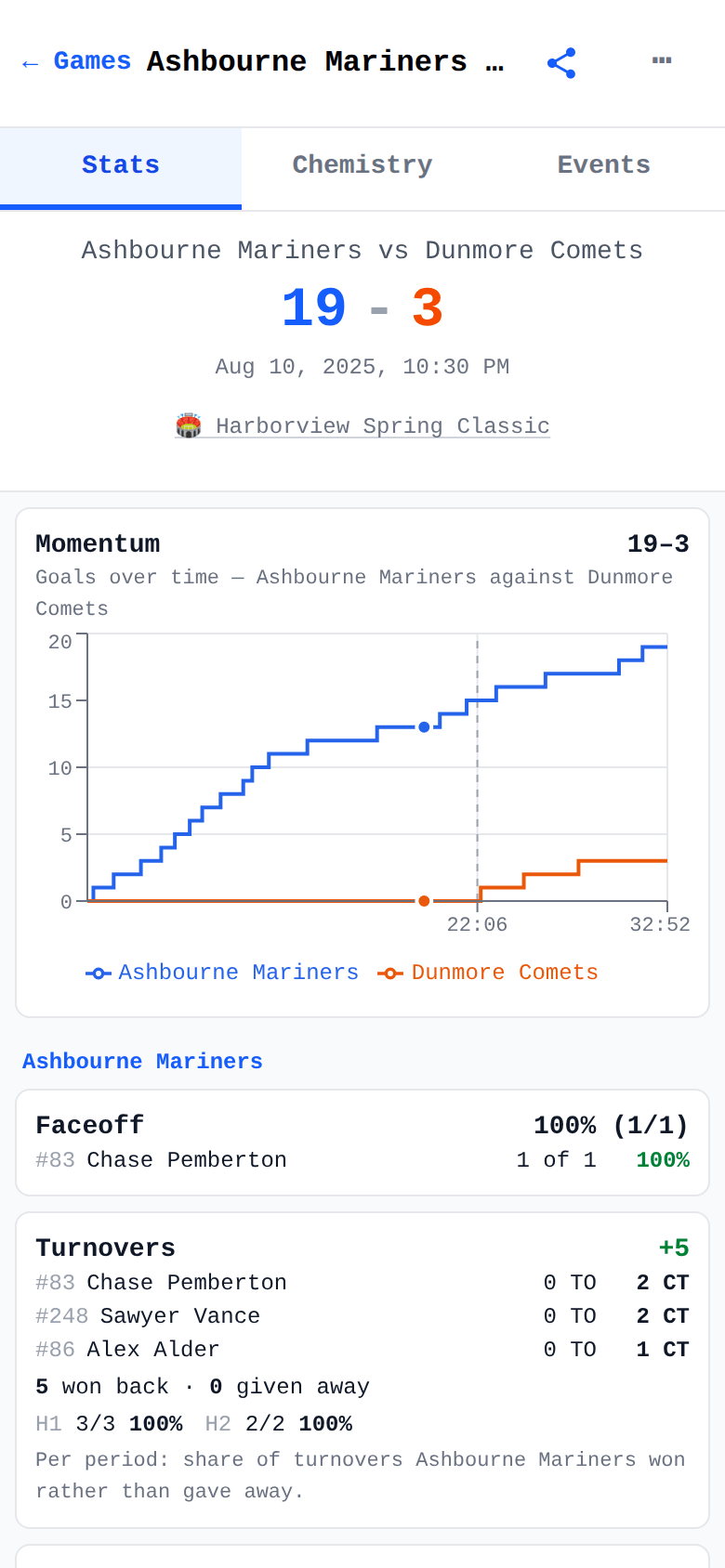
Completed game with momentum chart, clearing and riding splits, and per-player stat lines
One game’s story — momentum, splits, and every player’s line

After the whistle

Every game becomes a story

The final score says who won; the game detail shows how. The momentum chart draws the runs, the box score credits every line, and the event timeline replays it tap by tap.
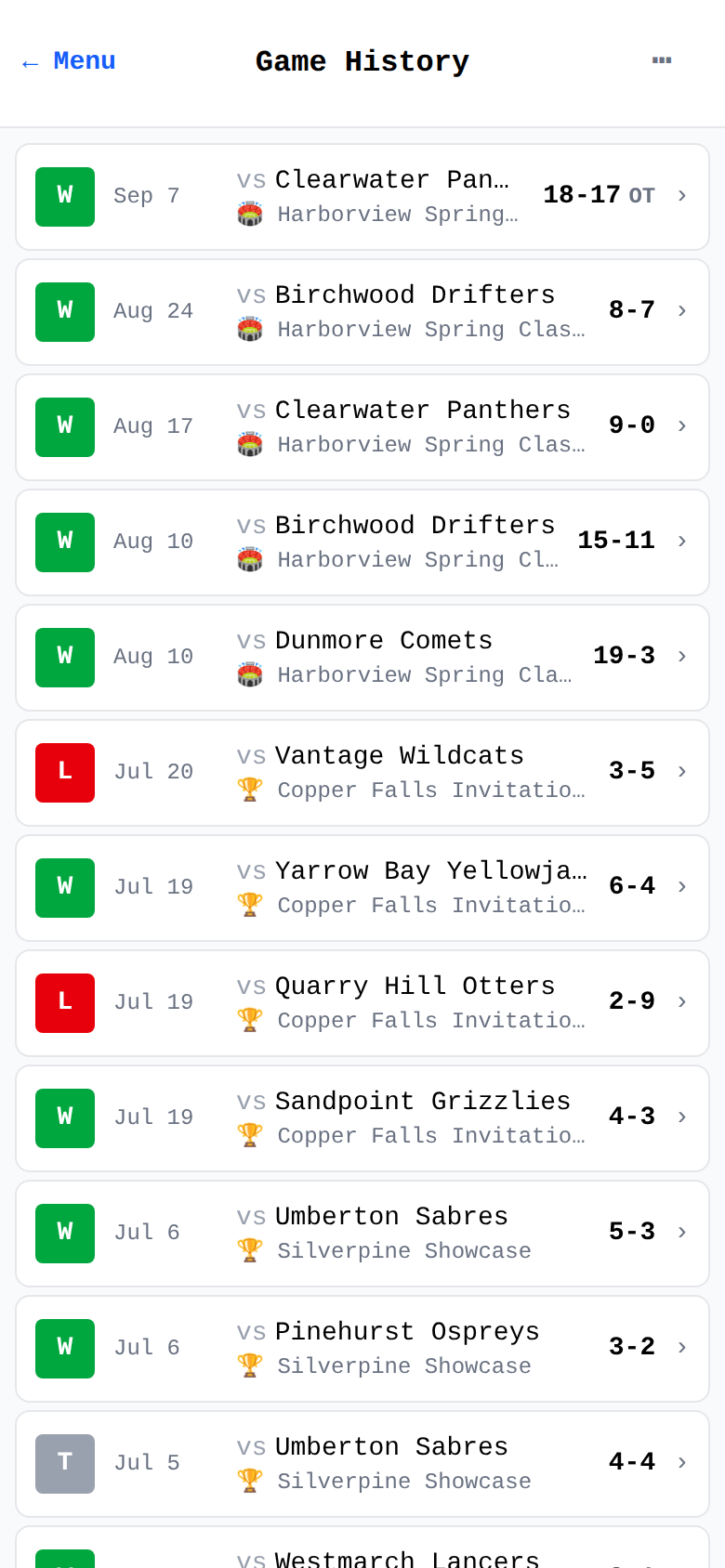
  • Game history with win/loss badges, newest first — filter by team, tournament, or year
  • Momentum chart of how the lead swung, period by period
  • Shot-pressure chart — both cages’ shots over the game clock, goals, saves and misses told apart (lights up when you track the opponent’s shots too); every game gets per-period shot bars
  • Full box score with every tracked stat, plus per-period clearing / riding splits
  • The complete event timeline — every goal, penalty, and timeout as it happened
  • Spot a phantom goal on the drive home? Correct it afterwards — the score, the box score, and every chart follow
  • Tournament pages with records and scoring leaderboards
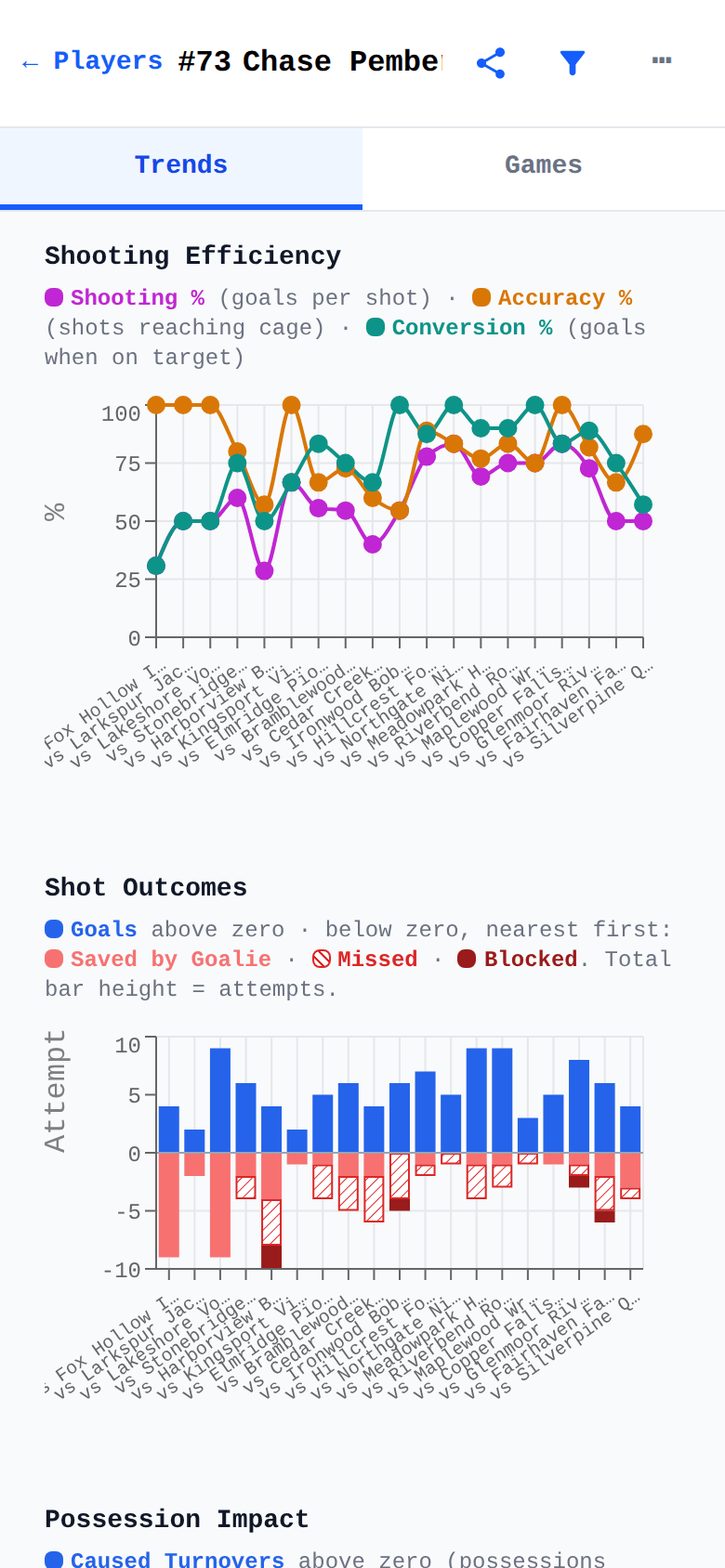
One player's game-by-game trend charts: shooting efficiency and shot outcomes across the season
One player’s season — shooting efficiency and shot outcomes, game by game

Player development

Watch them grow, game by game

This is the chart parents check on the drive home: one player’s season, game by game — shooting efficiency climbing, faceoff wins stacking up, development you can actually see. Coaches get the same view for every player on the roster. And every rate keeps its raw counts, so 1-for-1 never masquerades as 8-for-8.

  • Per-player trend charts across the season: shooting efficiency, shot outcomes, faceoffs, ground balls, goalie Save % and GAA
  • Career summary cards — points per game, shooting %, faceoff win % — each captioned with its raw counts
  • Leader boards for the whole squad on every one of those rates — players qualify on a minimum sample, then rank on the number you can read, so a single lucky attempt never tops the board
  • Any board shares as an image, carrying its definition and its qualifier cut with it
  • One filter everywhere: scope any view to a team, a tournament, or a year
  • Careers follow players across every team — development doesn’t reset when they move up a division
Team assist graph — a ring of players with weighted arrows showing who set up whom across the season
The team assist graph — who sets up whom

The crowd favorite

See who creates the goals

Assists tell you who passed; chemistry shows you who clicks. The team graph draws a season of connections — every arrow weighted by how often one player sets up another.
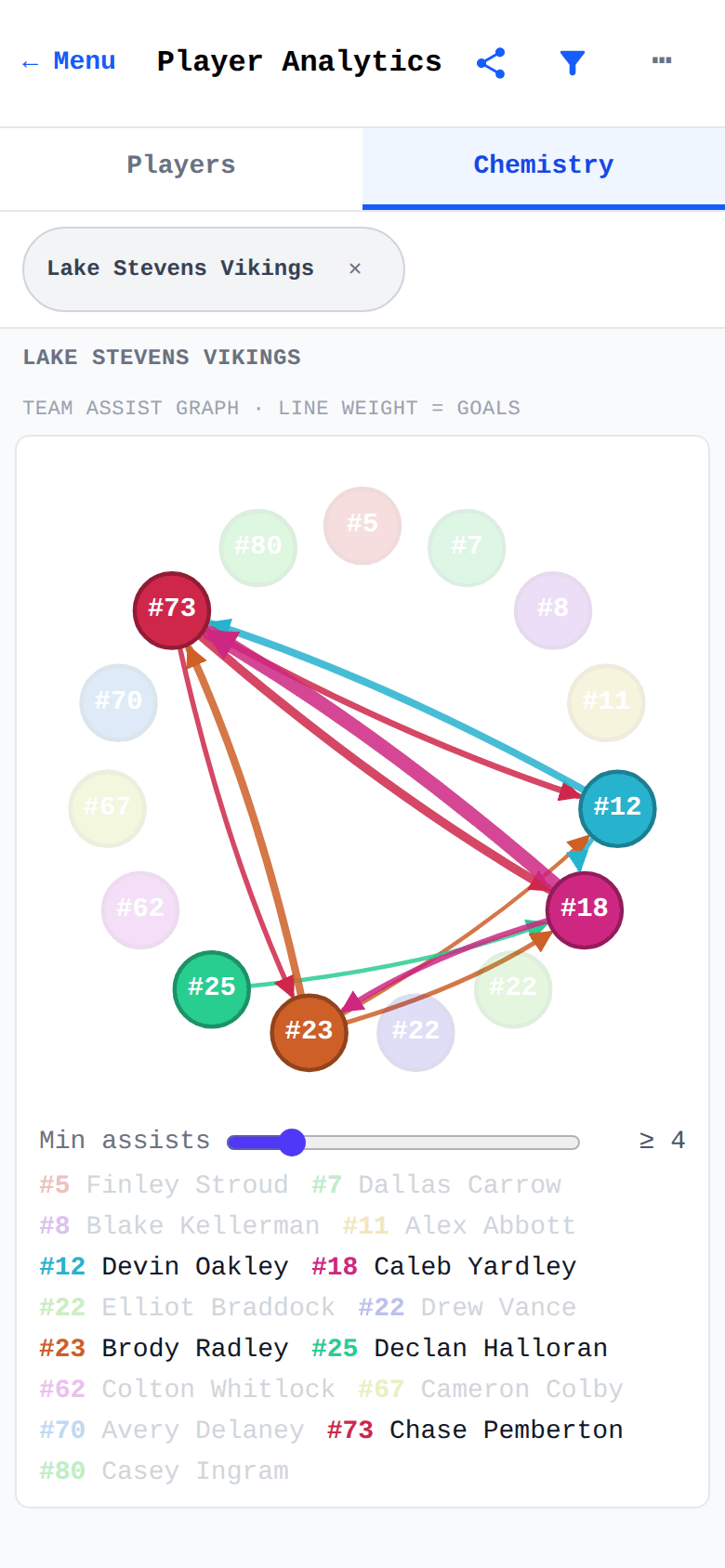
  • Team-wide assist graph — the season’s passing partnerships at a glance
  • Per-playmaker view: who each player feeds, and who feeds them
  • On every game’s detail for that game, and in analytics for the whole season
  • Share it as an image — the report that gets passed around the team chat
Game history list with win/loss badges and tournament tags — where past games are added and completed games are corrected
Game history — add what you missed, fix what came out wrong

After the fact

Nothing you tap is final

Nobody records a game perfectly with the game going on. So none of it is locked: correct a finished game weeks later, record one you only have on film, or enter a game nobody tracked at all from its final score. Stats are derived from what happened, so one correction moves the box score, the season charts, and the chemistry graph together.

  • “Review & correct stats” on any completed game — delete a phantom or mis-credited event, and it tells you first exactly what goes with it and what the score becomes
  • “Add event” records what the live tally missed — a goal (with the same assist and goalie prompts as live), shot, ground ball, penalty, or clear/ride, filed into the right quarter
  • Record a whole game from film at your own pace — it lands in history under the date it was actually played, not the night you typed it in
  • “Add a past game” takes a game nobody tracked from its final score alone; details stay honestly “not recorded” until you fill them in, and a score-only game is a fine place to stop
  • “Add a past season” takes a whole season straight off a stat sheet — games played, goals, assists per player — and keeps it a season record: it counts toward careers, but never dresses up as a game
  • Anything added later carries a quiet “added later” badge — the timeline never pretends it was live
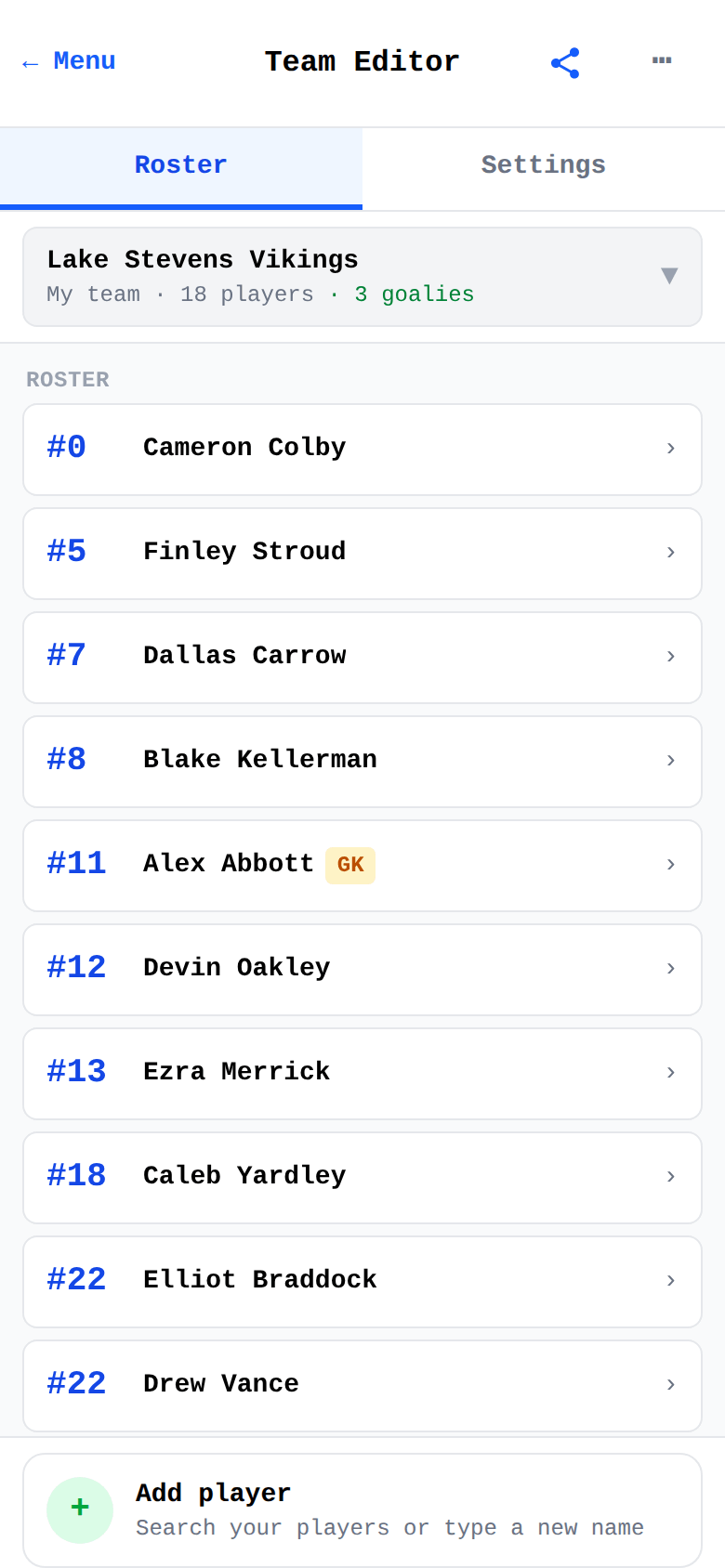
Team roster with jersey numbers, goalie badges, and search-first player add
A saved roster — numbers, goalies, and one-tap add

Set up once

Rosters that outlast the season

Build a team once and it’s ready every Saturday — including the other sideline. Opponents you’ve played are remembered, roster and all.

  • Positions — Attack, Midfield, Defense, Goalie — badged on every roster row
  • One player, several teams — a different number and position on each, one career
  • Choose per team which stats you track, and which penalty rules apply
  • New opponents are playable immediately; save them to your library after the game
  • Tournaments with dates, locations, and notes — game day auto-selects the right one
  • Forgot to tag Saturday’s game? Reclassify it afterwards in two taps
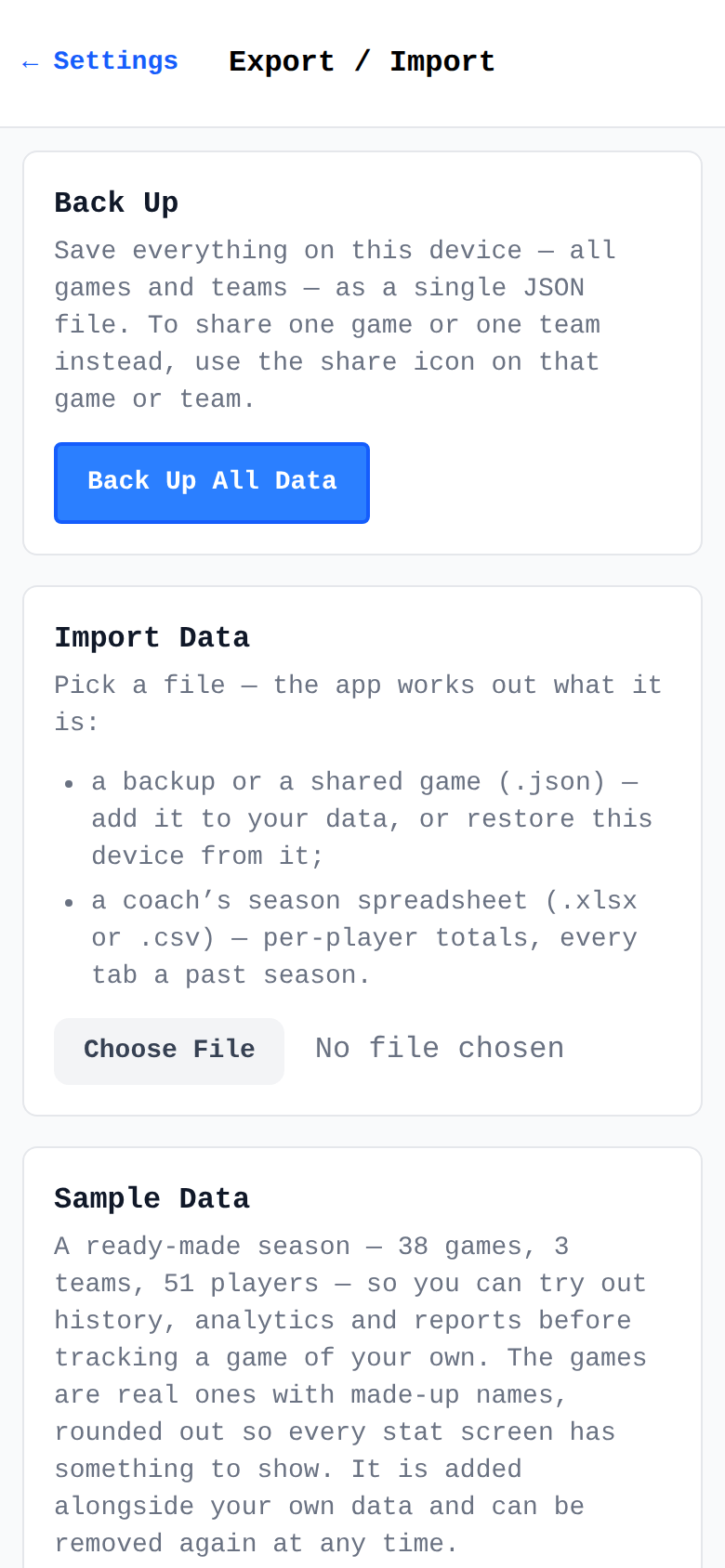
Export / Import tools: full backup, additive import, and one-tap sample data
Export / Import — backups, imports, and a sample season

Off your phone, into the group chat

Stats that travel

Everything the app knows can leave it — as a picture for the family, or as a file another phone can merge into its own records. That’s how a whole team tracks together.

  • Game finished? One tap shares its whole Stats tab as a picture — the momentum chart, the ratio panels, both box scores. Anyone can open it, no app required, so it goes straight to the parents’ chat
  • Or send that same game to another coach as data: “Add to My Data” merges it into their season without replacing anything they already have
  • Player season reports (charts included) and chemistry reports travel as pictures the same way
  • Coaches share the roster once, so every parent’s phone counts the same players
  • Full backup and restore — with an automatic safety backup before any restore

Ready for the next game?

Free · Works offline · No account · Your data stays on your phone